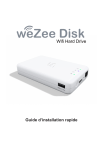
weZee Disk
Wifi Hard Drive
Guide d’installation rapide
Contenu du Package
Veuillez svp vérifier le contenu de l’emballage que vous avez
en main. S’il manque quelque chose, n’hésitez pas à contacter
votre distributeur local.
weZee Disk
Câble USB 3.0
weZee Disk
Wifi Hard Drive
Guide d’installation rapide
Guide d’installation rapide
Mini CD-ROM
Adaptateur (5V-1A)
Mises à Jour WeZee Disk
Pour toute Mise à Jour des Logiciels PC & Mac / Firmware / Applications / Manuels & Quick Guide/Langues complémentaires…
Veuillez SVP visiter le site Web Storex : http://wifidisk.storex.eu/
Présentation du weZee Disk
LED Niveau de batterie
LED Lecture / Ecriture
LED WIFI
LED WAN
PORT WAN RJ45
Bouton de réinitialisation
PORT USB 3.0
PORT USB 3.0
Bouton d’alimentation
Port WAN RJ45 : Pour connecter le weZee Disk à Internet via un Routeur/Switch
Connecteur USB 3.0 : Permet le transfert de données ultra rapide et la charge de la
batterie interne lorsqu’il est connecté à l’adaptateur d’alimentation.
Bouton d’alimentation : Appuyez 3 secondes pour allumer / éteindre l’appareil.
Port USB Host : Mode Power Bank pour recharger tout appareil utilisant un port USB
(weZee Disk éteint), puissance Max=5V/1A
Bouton de réinitialisation: Pour le réglage d’usine par défaut, appuyez 5 secondes sur
ce bouton lorsque le weZee Disk est allumé.
LED Niveau de batterie : La LED du niveau de batterie est:
a) Eteinte lorsque :
-L’appareil est hors tension.
-La batterie est complètement chargée (weZee Disk connecté à un adaptateur d’alimentation et en mode hors tension).
b) Verte pour indiquer que le niveau de la batterie est bon.
c) Verte, clignote lentement (2s) pour indiquer que la batterie est en charge.
d) Verte, clignote rapidement (0,5s) indique que l’appareil est en train de s’arrêter.
e) Rouge, clignote lentement indique un niveau de batterie inférieur à 30%.
f) Rouge, clignote rapidement indique que la batterie est vide et l’appareil va
s’arrêter dans les 6 secondes.
LED Lecture / Ecriture : La LED de Lecture / Ecriture est :
a) Blanche lorsque l’appareil est connecté en mode USB 2.0
b) Bleue lorsque l’appareil est connecté en mode USB 3.0
c) Clignote lors du transfert des données.
LED Wi-Fi : La LED WiFi est :
a) Bleue, clignote lorsque l’appareil est en cours d’initialisation.
b) Bleue et stable lorsque l’appareil est prêt à l’utilisation.
LED Wan : La LED Wan est :
a) Verte lorsque la connexion Internet est prête à l’utilisation.
b) Eteinte lorsqu’aucune connexion Internet est trouvée.
Chargement du weZee Disk
Branchez le câble USB fourni avec l’adaptateur d’alimentation
au weZee Disk déjà éteint.
Le témoin de niveau de batterie se met à clignoter toutes les
2 secondes pendant le temps de charge et s’éteint une fois
complètement chargé.
Transférer des fichiers
Branchez le weZee Disk (éteint) à n’importe quel port USB
disponible de votre ordinateur en utilisant le câble USB
fourni. Il fonctionnera tout simplement et le volume disque
apparaîtra comme tout autre disque dur externe. Vous
pouvez maintenant commencer à transférer des données
vers et à partir du weZee Disk.
Note : Le disque dur interne doit être formaté en utilisant l’un des deux
systèmes de fichiers suivants: NTFS ou FAT32.
Activer / Désactiver
Pour allumer le weZee Disk, appuyez sur le bouton d’alimentation
3 secondes qui se trouve sur le panneau avant.
Le weZee Disk va commencer le processus d’initialisation. Le
voyant d’alimentation (couleur verte) sera suivi du clignotement de
la LED Wi-Fi (couleur bleue).Une fois le processus d’initialisation
terminé, les LED disque dur, WiFi et alimentation restent allumés.
Pour éteindre le weZee Disk, appuyez sur le bouton d’alimentation
3 secondes et toutes les LED s’éteindront immédiatement.
Connexion au Wi-Fi
Le weZee Disk est accessible via tout type de dispositif :
PC Windows, Mac, iPhone / iPad, Tablet PC & Mobile Android via
les APPs et l’Utilitaire client ‘WeZee-Disk’.
Il suffit simplement de lancer une recherche des réseaux Wi-Fi
présents, de votre appareil mobile ou votre ordinateur, de sélectionner et se connecter au «WeZeeDisk-XXXX».
Une fois connecté, saisissez le mot de passe par défaut 11111111.
Utilitaire de connexion - Client PC
Utilisez votre ordinateur PC/Mac pour copier l’utilitaire appelé
«WeZee-Disk» et veuillez suivre les instructions à l’écran :
- Une fois le processus terminé, double-cliquez sur l’icône
«WeZee-Disk» sur votre bureau pour lancer l’utilitaire.
- Veuillez faire une recherche weZee Disk (Voir capture d’écran
ci-dessous).
- Sélectionnez l’option «WeZee-Disk».
- Cliquez sur le bouton «Connexion».
Note : Si l’utilitaire ne trouve pas le nom d’hôte «WeZee-Disk» avec
l’adresse IP 10.10.10.254, cliquez sur le bouton «Refresh».
La page Web de l’interface de gestion apparaît (Voir capture
d’écran ci-dessous) :
- Entrez «admin» dans le Nom d’Utilisateur et laissé la zone du
Mot de Passe vide (Par défaut).
Applications iPhone / iPad / Android
Veuillez télécharger et installer l’Application gratuite «WeZee-Disk» via :
- Apple ‘App Store’ (Pour les utilisateurs iPhone / iPad).
- Goole Play Store (Pour les utilisateurs Android).
- Puis, configurez votre iPhone / iPad, Tablet PC & Mobile Android pour
vous connecter au WiFi du WeZee-Disk.
- Lancez l’applet «WeZee-Disk» qui se connectera automatiquement
à votre weZee Disk.
Activation de l’Application sur iPhone & iPad
Remarque : L’application WeZee Disk intègre son propre lecteur
multimédia qui décode tout type de format Vidéo
- Vous avez 30 jours pour authentifier et enregistrer votre WiFi Disk en
ligne en suivant le processus ci-dessous. Passé ce délai, l’application
WeZee Disk décodage Vidéo sera désactivée.
- Si vous désirez réactiver ce décodage Vidéo, veuillez svp suivre le
processus inclus dans le manuel d’utilisation.
Après avoir téléchargé via Apple ‘App Store’ et installé l’Application
gratuite «WeZee-Disk» sur votre iPhone ou iPad.
1) Veuillez svp connecter le câble RJ45 provenant de votre routeur,
au port RJ45 de votre WeZee-Disk pour que ce dernier puisse
accéder à Internet.
2) Assurez-vous que la LED Wan Internet est bien allumée (Verte).
3) Veuillez svp connecter votre iPhone ou iPad au réseau WiFi de
votre weZee Disk.
4) Veuillez maintenant lancer la lecture d’une Vidéo sur votre
iPhone ou iPad, afin d’activer le décodage du lecteur multimédia
de l’application WeZee-Disk.
Pour toute demande de support ou de réparation technique, Veuillez
contacter le support technique à l’adresse suivante :
[email protected]
La garantie de STOREX est valable 1 an pour l’appareil, et 3 mois pour
les accessoires (alimentation, CPL ...).
STOREX garantit votre périphérique contre tout défaut de fabrication
ou d’assemblage. Cette garantie s’applique uniquement à la première
acquisition de l’appareil par un utilisateur final et n’est pas transférable
si l’appareil est revendu. Cette garantie ne couvre pas les incompatibilités trouvées par l’utilisateur final en dehors des recommandations
spécifiées sur l’emballage, ou toute incompatibilité générée par les
autres matériels ou logiciels.
La garantie ne couvre pas les pannes ou les défauts induits par le
non-respect des instructions de ce manuel, y compris l’altération, une
installation incorrecte, la réparation, essai inadéquate, un accident ou
facteur externe tels que :
La chaleur excessive, l’humidité ou des pannes de courant.
La seule obligation contractuelle approuvée par STOREX trait à la réparation ou au remplacement d’un produit défectueux.
Cette garantie de votre appareil est clairement définie et ne peut pas
être modifiée, augmentée ou diminuée, sans le consentement écrit de
STOREX.
Cette garantie couvre uniquement votre appareil et est régie par la loi
française.
Remarque : STOREX™ se réserve le droit de modifier le manuel de
l’utilisateur sans préavis en fonction du développement du produit et
des mises à jour.
est le logo déposé de STOREX.
">